What Is Sensor Cooking on a Microwave?
Microwave sensor cooking uses moisture or steam from food to adjust cook time automatically. Choose a matching food setting, then let the microwave run its cycle.
On this page (10 sections)
- What is sensor cooking on a microwave?
- How does microwave sensor cooking estimate the time?
- How do you use a sensor cooking setting?
- What foods work well with microwave sensors?
- What is the difference between sensor cooking and inverter technology?
- How do you choose a sensor cooking microwave?
- When should you use manual microwave settings?
- What mistakes should you avoid with sensor cooking?
- How should you care for a microwave sensor?
- Is a sensor cooking microwave right for you?
Microwave sensor cooking uses moisture or steam released by food to estimate the remaining cook time. If you're asking what sensor cooking on a microwave is, think of it as an automatic timing aid: choose a food setting, start the cycle, and let the microwave adjust as the food heats.
It can simplify reheating leftovers and cooking foods that match a preset. The right setting, a suitable container, and the way food is covered all affect how well the cycle works.
What is sensor cooking on a microwave?
Sensor cooking is an automatic program that estimates cook time from moisture released by food. A sensor detects steam inside the microwave, and the control uses that signal to adjust the rest of the cycle.
The presets vary by model. They may include options for sensor reheat, vegetables, rice, popcorn, or frozen foods, so check that a microwave offers settings for the foods you cook most.
Sensor cooking doesn't directly check the temperature at the center of a dish. After the cycle, stir when possible and check that the food is hot throughout.
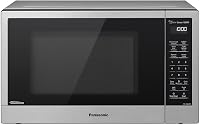
The Panasonic NN-SN67KS has 16 sensor cook settings and a sensor reheat option. Panasonic describes its Genius Sensor as measuring steam to calculate the remaining cooking time.
How does microwave sensor cooking estimate the time?
The sensor tracks moisture or steam from food and the microwave uses that signal to estimate the remaining cook time. It doesn't inspect every part of the food or measure its center temperature.
As food heats, moisture escapes and collects in the microwave. A sensor program responds to changes in that moisture, using its preset for the selected food to guide the cycle.
This is useful for ordinary reheating and common foods, but the program can't account perfectly for every portion size or arrangement. A tall container, a tightly packed plate, or a mixture of foods may heat unevenly.
Use a microwave-safe dish and follow the manual's instructions for covering, venting, stirring, and standing time. If cold spots are a recurring problem, see why microwaves heat unevenly.
How do you use a sensor cooking setting?
Choose the sensor setting that best matches the food, then let the full cycle finish. Use the manual's directions for cover placement, stirring, and standing time.
- Place the food in a microwave-safe dish as directed.
- Select the closest matching sensor program, such as reheat or vegetables.
- Start the cycle without adding a time unless the manual instructs you to.
- Wait for the microwave to finish before opening the door.
- Stir, check the center, and allow standing time if the recipe or manual calls for it.
If food is still cool, continue in short manual intervals and stir between them. That gives you control without restarting a sensor cycle that may not match the food's remaining needs.
Should you cover food during sensor cooking?
Use the cover method recommended for that sensor setting. Some programs call for a vented cover, while others may work best uncovered.
A microwave-safe cover helps contain splatter, but a tight seal can trap steam. Leave a vent when the instructions call for one, and don't assume the same cover method works for every food preset.
What foods work well with microwave sensors?
Sensor cooking works best when the microwave has a preset that matches the food. Reheating leftovers and cooking vegetables are common uses, while other options depend on the model.
Avoid treating a sensor button as a universal cook setting. Dense portions, mixed dishes, unusual containers, and food packed tightly together can heat differently from what the program expects.
For food without a matching setting, use package or recipe directions as a starting point and choose manual time and power. Check and stir the food as needed instead of relying on a preset designed for another type of dish.
What is the difference between sensor cooking and inverter technology?
Sensor cooking adjusts timing based on moisture; inverter technology controls how cooking power is delivered. They address different parts of microwave cooking and can be combined in one appliance.
An inverter microwave can deliver a steady stream of cooking power, while a sensor program uses steam information to estimate timing. If even heating matters to you, compare models in our guide to best inverter microwaves.
The Panasonic NN-SN67KS, NN-SN67QS, and NN-SN75LB combine inverter technology with sensor cooking. You can choose a model based on capacity and its preset options, rather than treating one feature as a replacement for the other.
How do you choose a sensor cooking microwave?
Choose by matching the sensor presets, capacity, and manual controls to the food and portions you handle most. Sensor cooking is useful when its automatic programs fit your routine, but it shouldn't be the only feature you compare.
Start by checking the preset list. If you regularly reheat leftovers, look for sensor reheat; if you want automatic options for vegetables, frozen foods, or other meals, confirm those settings are included.
Next, consider interior capacity and counter space. A 1.2 cu ft model is a sensible fit for everyday plates and smaller kitchens, while a 1.6 cu ft model gives more room for larger dishes and family portions.
Measure the available space, including room around the microwave as its manual requires.
Finally, decide how much you want to control manually. Useful manual time and power settings matter when you cook foods without a matching sensor program.
For a broader checklist, read how to choose a countertop microwave.
Which Panasonic sensor microwave fits your kitchen?
The NN-SN67KS suits cooks who want many sensor options in a 1.2 cu ft microwave; the NN-SN75LB suits larger portions. The NN-SN67QS is another 1.2 cu ft choice if its 1250 watts and sensor reheat fit your priorities.
The NN-SN67KS combines a 1.2 cu ft capacity, 1200 watts, 16 sensor cook settings, and sensor reheat. Choose it if you value the broadest specified range of sensor presets among these three models.
The NN-SN75LB has 1.6 cu ft of capacity, 1250 watts, and 20 preset smart cooking options, including sensor cook and sensor reheat. Its larger interior makes it the clearest fit for larger plates and family-size portions, but skip it if counter space is tight or you rarely use larger dishes.
The NN-SN67QS has 1.2 cu ft of capacity and 1250 watts, along with Genius Sensor cooking that adjusts time and power based on food moisture. Choose it if you want those features in a mid-size model; skip it if you specifically want the NN-SN67KS's 16 sensor cook settings.
When should you use manual microwave settings?
Use manual settings when you need a specific time and power level or the microwave has no matching sensor program. Manual control also helps when a sensor cycle ends before food is fully heated.
Follow recipe directions where available, then use short intervals and stir when practical. Check the center as well as the edges before serving, especially with thick portions or mixed dishes.
Wattage can affect the time needed for manual cooking. Our guide to how many watts a microwave uses explains what microwave power means when you're comparing models.
What mistakes should you avoid with sensor cooking?
The most common mistake is expecting a sensor cycle to work the same way for every food and container. Match the preset, follow cover directions, and check the food when the cycle ends.
Don't add a cook time before starting a sensor program unless the manual asks you to. Don't tightly seal a covered dish when the setting calls for venting, and don't interrupt the cycle to stir unless the instructions say to do so.
Clean food splatters from the microwave interior and around the sensor area as directed in the manual. Buildup can interfere with normal use, while harsh cleaners or blocked vents may damage the appliance.
How should you care for a microwave sensor?
Keep the interior and sensor area clean, and follow the manual's cleaning instructions. Regular care helps prevent food residue from building up around the surfaces used during cooking.
Wipe spills after the microwave has cooled, using a soft cloth and a cleaner suitable for the interior. Avoid spraying cleaner directly into vents or control openings, and don't scrub sensor areas with abrasive tools.
If a sensor cycle behaves unexpectedly, first confirm that the selected setting, food placement, and cover match the manual. Switch to manual cooking and contact the manufacturer for appliance guidance if the issue continues.
Is a sensor cooking microwave right for you?
Choose a sensor microwave if you often reheat familiar foods and want presets to adjust timing for you. Choose a simpler model or rely on manual settings if you prefer exact time and power control or mostly cook foods without matching presets.
For everyday portions and a wide sensor menu, the NN-SN67KS is the strongest fit here. Pick the NN-SN75LB for more interior room and 20 preset options, or the NN-SN67QS if you want a 1.2 cu ft model with 1250 watts and sensor reheat.
Whichever model you choose, treat sensor cooking as a helpful timing feature, then stir and check food before serving. Use how to choose a countertop microwave to compare capacity and controls alongside sensor features.
Frequently asked questions
What does sensor cooking do on a microwave?
Sensor cooking measures moisture or steam released by food and uses that information to adjust the remaining cook time. Choose a matching setting, such as sensor reheat or vegetables, and let the microwave complete its cycle.
Results depend on the food, portion, container, and the microwave's instructions.
Do you add water for microwave sensor cooking?
Not usually for the sensor itself; it detects moisture released by food as it heats. Some foods need water for the recipe, so follow the food directions and your microwave manual.
Don't add water just to trigger a sensor unless the appliance instructions tell you to.
Is sensor cooking the same as inverter technology?
No. Sensor cooking adjusts time based on moisture from the food.
Inverter technology controls how cooking power is delivered.
A microwave can have both features, but either one can also appear without the other.
Can you open a microwave during sensor cooking?
Opening the door usually stops the microwave and may interrupt the sensor program. Check your manual to see whether that setting can resume.
If you open it to stir or check food, use a separate manual cook period afterward and confirm the food is hot throughout.